01 / Get familiar
What you’ll practise.
Some UK train operating companies include OPC’s Visual Search Exercise (VSE) alongside vigilance and rule checks. Instead of testing vigilance and visual comparison separately, a VSE-style task checks whether you can maintain peripheral awareness of a steady loop while comparing scrambled lists of shapes in the centre.
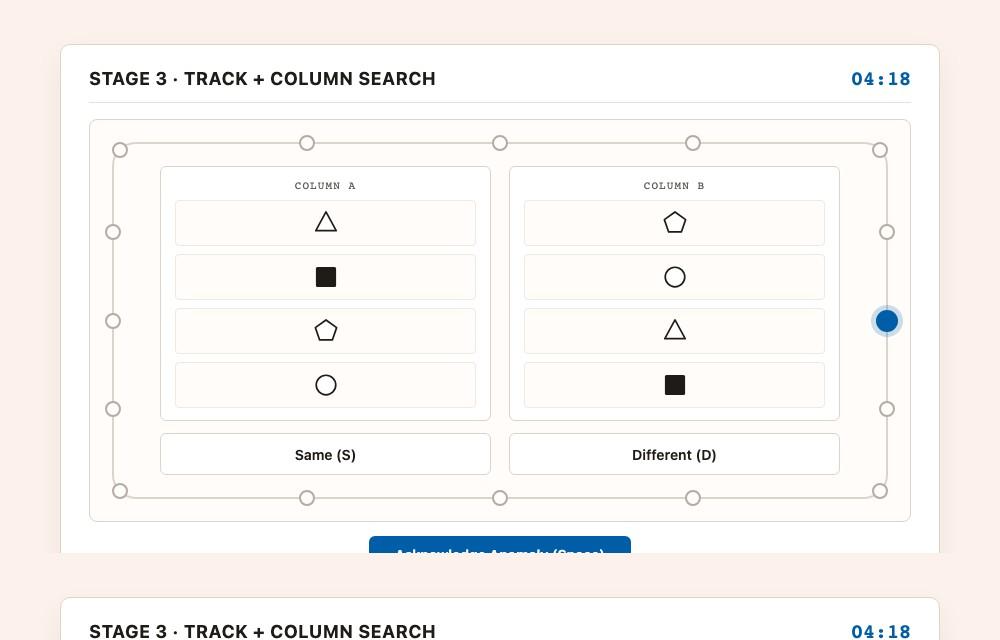
Our independent Track & Shape Search trainer does not clone the official Candela VSE screen or exact stimuli. Rather than memorising one interface, candidates practise the underlying cognitive split across three dedicated free stages: outer track vigilance alone (3 minutes), two-column shape comparison alone (3 minutes), and both running together (5 minutes).
On every outer track stage, a blue marker steps steadily clockwise around a 16-station loop and occasionally double-jumps forward, steps backward, or changes colour to amber. In the centre, two columns display 3 to 5 monochrome shapes or polygons in different orders—you decide whether both columns contain the exact same set (ignoring row order) or whether one shape differs.
Divided Attention
Splitting focus between active column comparison in the centre and passive vigilance around the outer track.
Peripheral Vigilance
Catching skipped stations, backward steps, or marker colour changes without interrupting your central cross-checking flow.
Set Matching & Attention to Detail
Verifying whether two scrambled lists of polygons contain the exact same items regardless of vertical order.
Impulse Control
Suppressing false-positive Space presses when scanning quickly between columns.
Three ways to practise
Stage 1: Outer Track Vigilance
Build steady peripheral tracking on a 16-station closed loop and learn to respond only to genuine skips or step reversals.
- Loop vigilance
- Reaction time
- False-alarm control
Stage 2: Shape Column Comparison
Compare two vertical columns of 3–5 geometric polygons shown in different orders and judge whether both columns match.
- Set matching
- Polygon detail
- Scanning pace
Stage 3: Combined Track + Column Search
Compare both shape columns in the centre while monitoring peripheral loop skips and reversals around the edge.
- Dual-task split
- Track hits & RT
- Comparison accuracy
02 / The format
How the practice works.
Practise Stage 1: Outer Track (3 min)
Follow a 16-station closed loop and react with Space or tap whenever the moving marker double-jumps forward, steps backward, or changes colour to amber.
Practise Stage 2: Column Comparison (3 min)
Compare Column A and Column B (3 to 5 shapes in scrambled order) and choose Same or Different using S / D (1 / 2) or tap.
Run Stage 3: Combined Search (5 min)
Compare scrambled columns continuously while reacting to irregular steps around the outer loop.
03 / Your approach
A few things to try.
Keep soft peripheral awareness
Do not lock your gaze rigidly onto one shape row. Check Column A against Column B smoothly while noticing rhythm changes around the perimeter loop.
Acknowledge once per irregularity
Press Space or tap Acknowledge Anomaly as soon as you spot a skip or reversal, then continue checking the current columns without panicking.
Scan methodically top-to-bottom
Pick each shape down Column A and confirm it appears in Column B (in any order). Look closely at hollow vs solid fills and pentagons vs hexagons.
Build stages before combining
Spend time in Stage 1 (outer loop) and Stage 2 (column comparison) individually so neither response feels hesitant when you run Stage 3.
04 / Before you begin
Common questions.
What is the Visual Search Exercise (VSE) test?
The Visual Search Exercise (VSE) used by some UK train operators tests divided attention and visual search: candidates monitor a moving marker around an outer track for irregular movements while comparing two columns of shapes in different orders to decide if they match.
Does row order between Column A and Column B matter?
No. In both our practice and the VSE concept, the two columns deliberately present the shapes in different orders. Both columns count as the Same whenever they contain the exact same set of shapes, and Different when one shape swaps for another.
Why is your practice called Track & Shape Search instead of VSE?
Track & Shape Search is our original, independent trainer built to develop the exact same divided-attention skills—outer loop vigilance and unordered column matching—using our own polygons and timing rather than reproducing proprietary OPC Candela software or trademarks.
How are the three practice stages structured?
You can pick any stage individually: Stage 1 runs 3 minutes of outer track vigilance alone, Stage 2 runs 3 minutes of two-column shape comparison alone, and Stage 3 runs 5 minutes with both tasks active together.
What controls work on desktop and mobile?
On desktop, press Space for outer loop anomalies and S / D (or 1 / 2) for Same vs Different. On phones and tablets, tap Same or Different inside the centre box and tap Acknowledge Anomaly below the loop.
Are there official pass marks for Track & Shape Search?
Your summary reports outer track hits, missed anomalies, false alarms, mean reaction time in milliseconds, and column comparison accuracy. These are independent practice metrics rather than official train operator pass standards.